Nativity Card Design: A Comprehensive Guide to SVG, DXF, and Digital Cutting Compatibility
The creation of a Nativity Card has evolved significantly from simple hand-cut paper crafts to sophisticated digital design projects. For crafters utilizing modern electronic cutting machines, the term Nativity Card now refers to a complex assembly of layered elements that can be precisely rendered in vector formats like SVG, DXF, and PDF. These digital files are not merely images; they are structured blueprints designed to work seamlessly with software ecosystems such as Cricut Design Space, Silhouette Studio, and Brother Scan-N-Cut.
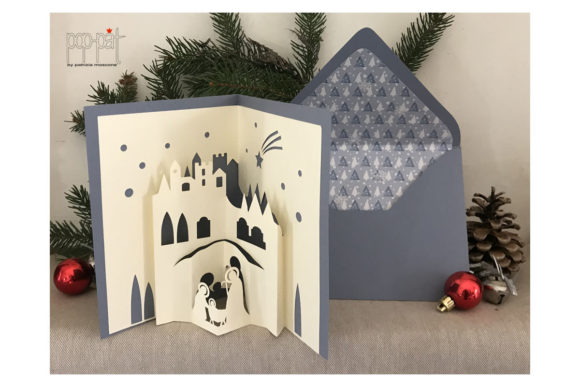
When evaluating options for holiday crafting, it is essential to understand what distinguishes a high-quality digital Nativity Card file from a standard raster image. The core distinction lies in scalability and editability. Unlike a JPEG or PNG, which can become pixelated when enlarged, vector-based designs allow you to resize your Nativity scene from a small greeting card to a large display piece without losing definition. This capability is fundamental to creating professional-looking results at home.
Understanding File Formats and Software Compatibility
Selecting the right digital asset often begins with understanding the technical requirements of your specific machine. The market offers several file types, each serving a distinct purpose within the crafting workflow.
- SVG (Scalable Vector Graphics): This is the most versatile format for Cricut users. An SVG file contains multiple layers, allowing the software to separate the background, the figures of Mary, Joseph, and the baby Jesus, and the text into individual cut paths. This layering is crucial for creating depth in a 3D-style Nativity Card.
- DXF (Drawing Exchange Format): While similar to SVG, DXF files are often preferred by users of older software versions or those who primarily use Silhouette Studio. They provide precise geometric data but may sometimes require additional cleanup in the software before cutting.
- PDF (Portable Document Format): PDFs are excellent for printing physical templates or for use with machines that rely on camera tracking, such as the Brother Scan-N-Cut. However, unlike SVGs, PDFs do not always retain editable layers unless specifically saved with vector data intact.
The compatibility between these formats and your chosen software is a critical decision factor. If you own a Cricut machine, an SVG file is generally the optimal choice because it integrates directly into Cricut Design Space, preserving all color assignments and layer groups. Conversely, if you utilize Silhouette Studio, a DXF file might offer better fidelity for intricate line work, though Silhouette Studio also handles SVGs proficiently in its free version with some limitations on advanced features.
The Role of Photo Tutorials in Learning Complex Designs
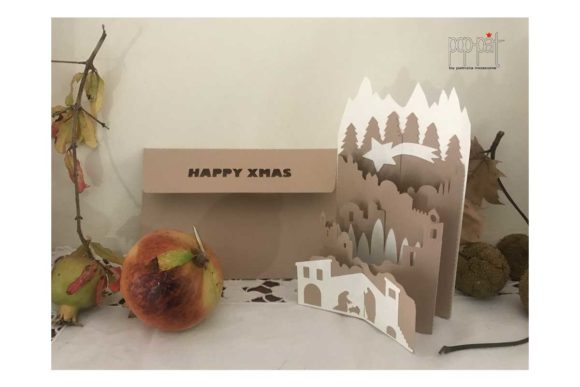
One of the most valuable components of modern digital Nativity Card resources is the inclusion of photo tutorials. Crafting a multi-layered nativity scene involves more than just pressing "cut." It requires strategic assembly, gluing techniques, and folding methods to achieve the desired dimensionality.
Photo tutorials bridge the gap between the digital file and the physical product. They provide step-by-step visual guidance on how to handle delicate pieces, such as the wisps of hair or the folds of robes in a Nativity figure. Without this visual aid, a crafter might struggle with the orientation of layers or the placement of adhesive, leading to frustration and wasted materials. When choosing a resource, prioritize those that include comprehensive photographic guides alongside the digital download.
Evaluating Strengths and Tradeoffs of Digital Nativity Cards
As with any crafting method, there are inherent strengths and tradeoffs to consider when deciding to use a pre-made digital Nativity Card versus designing one from scratch or using traditional paper crafting tools.
Strengths of Digital Files:
- Time Efficiency: Downloading a prepared file eliminates hours of drawing and tracing. You can go from concept to finished card in a fraction of the time required for manual design.
- Consistency: If you need to create multiple cards for family members, digital files ensure that every single card is identical in quality and alignment. This consistency is difficult to achieve with hand-drawn elements.
- Complexity: Intricate details that would be nearly impossible to cut with scissors, such as fine lace patterns on a robe or detailed facial features, are easily handled by laser-precise cutting machines.
Potential Limitations:
- Software Learning Curve: While the cutting process is automated, managing the software interface can be challenging for beginners. Understanding how to ungroup layers, weld shapes, or mirror images requires practice.
- Material Dependency: The success of a Nativity Card often depends on the material used. Some digital files assume the use of heavy cardstock, while others are designed for vellum or foil transfer sheets. Using the wrong material can ruin the structural integrity of the design.
- Cost of Equipment: To fully leverage a Nativity Card file, you must invest in a compatible cutting machine and the necessary software subscriptions, which may be a barrier for casual hobbyists.
Comparing Approaches: Digital vs. Traditional Methods
When comparing digital Nativity Card solutions to traditional methods, the primary difference lies in precision versus tactile experience. Traditional paper crafting allows for spontaneous creativity and the use of mixed media, such as watercolor washes or real fabric, which can add a unique, organic feel to the card. However, achieving symmetrical cuts and perfect alignment in traditional crafting often requires steady hands and significant patience.
Digital methods excel in repeatability and detail. If your goal is to produce a set of uniform cards with complex geometric patterns or precise typography, the digital route is superior. Furthermore, the ability to edit the text within an SVG file means you can personalize the message on a Nativity Card without needing to redraw the entire design. This flexibility makes digital files particularly attractive for parents or teachers looking to create personalized gifts for many recipients.
Decision Factors: Choosing the Right Resource for Your Needs
Selecting the appropriate Nativity Card resource depends heavily on your specific goals, the tools you already possess, and the level of customization you desire. There is no single "best" option; rather, the right choice aligns with your current capabilities and project scope.
If you are a beginner with a Cricut Explore or Maker, look for resources labeled as "Beginner Friendly" or those that come with video instructions. These files typically have fewer layers and simpler assembly steps, reducing the likelihood of errors during the initial learning phase. In contrast, experienced crafters might prefer complex files that feature thousands of cut lines, offering a challenge and a highly detailed final product.
Consider the intended recipient and the occasion. A quick, heartfelt card for a neighbor might only require a simple, single-layer cut from a PDF template. However, a centerpiece for a church bulletin board or a premium gift for a close relative might warrant a multi-layered, 3D pop-up design available only in SVG format. The complexity of the design should match the importance of the event.
Maximizing Value Across Different Platforms
It is important to note that the value of a digital file extends beyond the cutting process. High-quality resources often include bonus elements, such as coordinating clipart, font suggestions, or printable tags. When evaluating a Nativity Card download, check if the package includes a full suite of assets. For instance, a file that provides both the main scene and matching envelopes or backing cards adds significant value compared to a standalone image.
Additionally, verify the licensing terms. Some creators offer personal use licenses, while others allow commercial use, enabling you to sell your finished cards. If you plan to generate income from your crafting, ensuring the license permits commercial activity is a non-negotiable step in your evaluation process.
Conclusion: Making an Informed Choice
The world of digital crafting offers incredible opportunities to bring the story of the Nativity to life through creative expression. Whether you choose an SVG for Cricut, a DXF for Silhouette, or a PDF for Scan-N-Cut, the key to success lies in understanding the strengths and limitations of each format. By carefully considering factors such as software compatibility, material choices, and the availability of instructional support, you can select a Nativity Card resource that fits your needs perfectly.
Ultimately, the technology serves as a tool to enhance your creativity, not replace it. The warmth and thoughtfulness behind a handmade card remain the most important elements, regardless of whether the cuts were made by a human hand or a digital blade. As you explore your options, focus on finding resources that empower you to create something meaningful and beautiful for yourself and your loved ones.